AI golf coach · GPS caddy

Your AI golf coach. In every phone.

Film your swing with your phone. In about 20 seconds TakeDivotAI tells you what happened, why, and how to fix it. Then take it to the course as your GPS caddy.

First month free · 10 AI analyses included
~20 sper swing analysis
2 in 1coach and GPS caddy
3languages: EN, CS, DE
0extra hardware
Scroll to explore
Why TakeDivotAI

A coach is expensive.
A phone is in your pocket.

Recreational golfers want to know why the ball doesn't go where they aim. Lessons cost money, and your coach can't come to every practice session.

The problemOur answer

You see the result, a bad shot, but not the cause.

Film your swing. In about 20 seconds the AI explains what happens, why, and how to fix it.

Lessons are expensive and irregular.

Get coaching feedback at every practice session.

Radars and sensors cost a fortune.

All you need is your phone.

Stats, GPS and practice live in separate apps.

One app for practice (Coach's Mode) and play (Caddy's Mode).

Most golf apps are English-only.

In your language: the app and the AI swing analysis.

How it works

From swing to round in four steps.

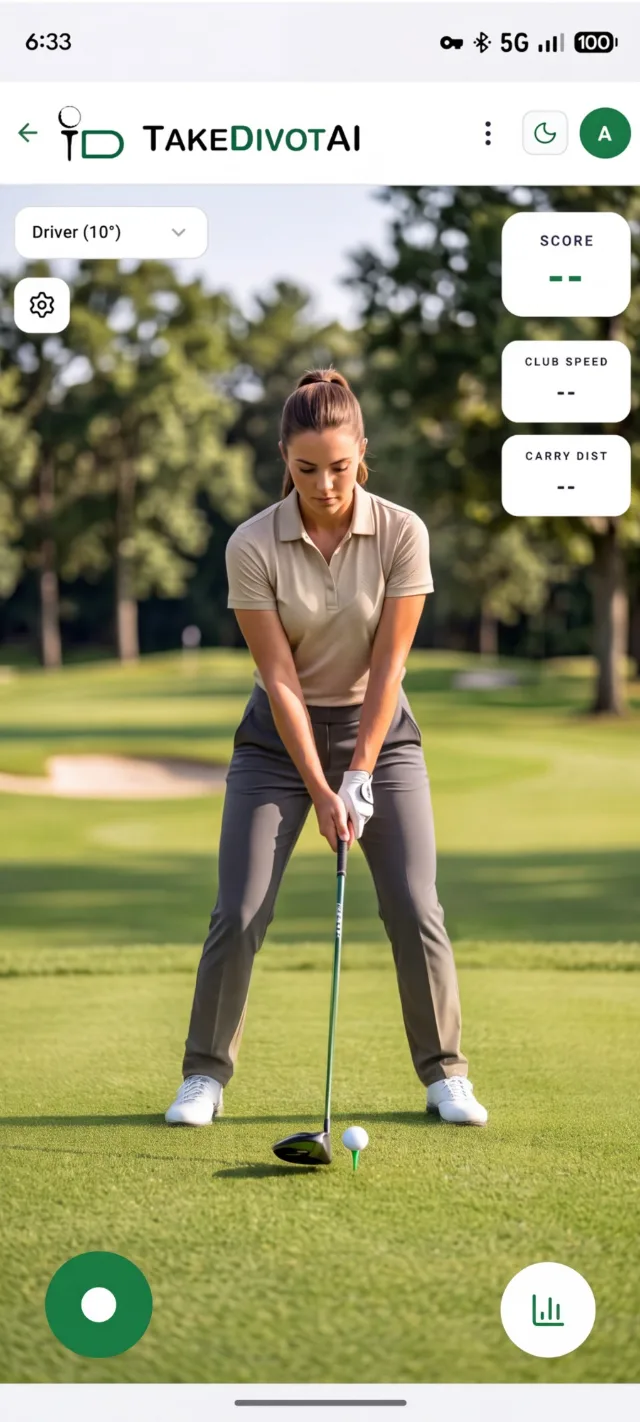
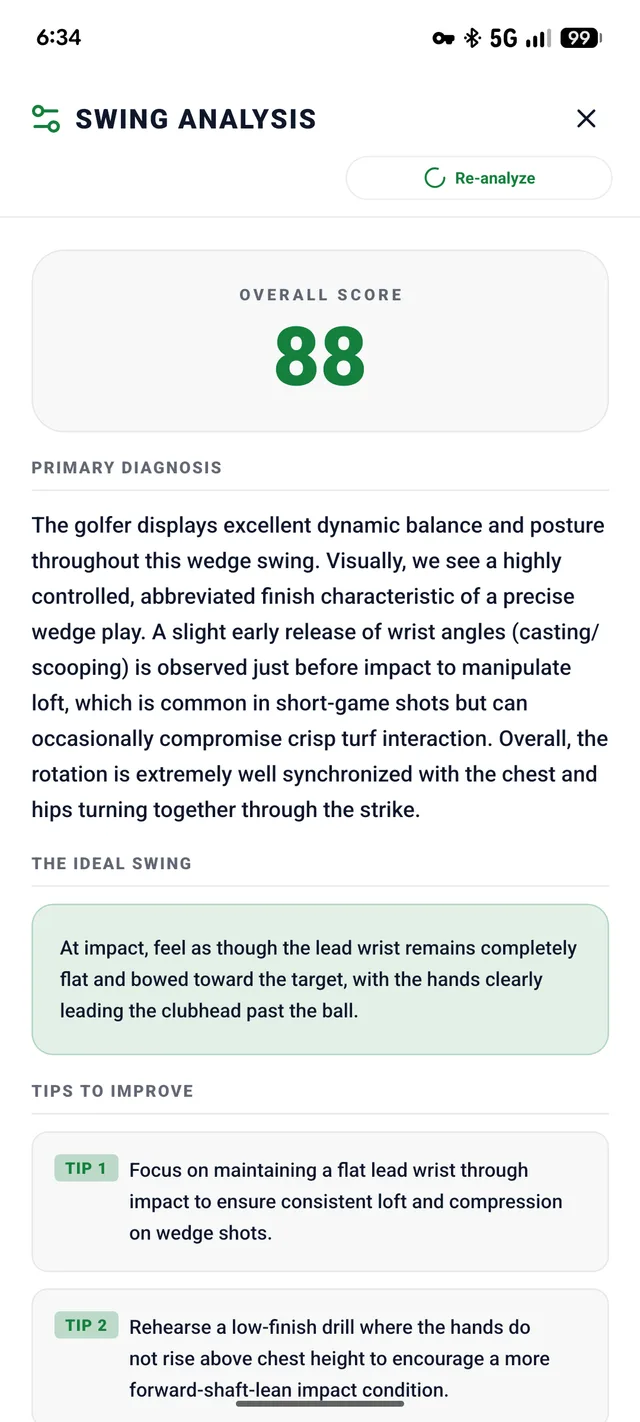
Replay Theater showing a golfer at the top of the backswing with score 88, club speed 116 kph and carry 84 m Swing analysis with overall score 88, primary diagnosis and tips Replay Theater with a swing plane line and head box drawn on the video Caddy map with distance to pin and recommended driver
Coach's Mode · AI analysis

A score, and the reasons behind it.

The AI looks at your swing the way a coach would and writes it up in plain language, in your language.

  • Overall score from 0 to 100, so you can track your progress
  • Primary diagnosis: what happens in your swing and why
  • The ideal swing: the feel to look for
  • Three concrete tips to take to practice
  • Club speed and carry estimated from the video alone
  • Biomechanics lab: hips, torso, arms and hands against a pro sequence

Speed, distance and scores are visual AI estimates for tracking trends. They don't replace radar or sensor-based launch monitors.

88
Overall score
Est. speed116KPH
Est. carry84M

Primary diagnosis

Excellent dynamic balance and posture through this wedge swing. A slight early release of the wrist angles shows just before impact, which can cost you crisp contact with the turf. Hips and chest turn together through the strike.

The ideal swing

At impact, feel the lead wrist stay flat and bowed toward the target, with your hands clearly leading the clubhead past the ball.

Tips to improve

  1. TIP 1Keep a flat lead wrist through impact for consistent loft and compression.
  2. TIP 2Rehearse a low finish, with your hands no higher than your chest.
  3. TIP 3Hit body-turn-only pitches with your arms pinned to your ribcage.
Biomechanics lab

85% EFF
Hips Torso Lead arm Hands
TOP IMPACT
Sequence verdict

Very efficient sequence for a wedge shot. The hips start the downswing, then the torso, arms and hands follow smoothly.

Normalized rotational velocity. Optimal sequence: hips → torso → lead arm → hands. A visual model estimated by computer vision.

Coach's Mode · Replay Theater

Video like a coaching session.

Every swing is saved, so you can break it down again whenever you want.

  • Frame by frame, with slow motion from 0.1× to 1×
  • Draw lines, arrows and boxes on the video, like the swing plane or head position
  • Score, speed and carry always on screen
  • Share the video with friends or your coach
  • Back up videos to your own Google Drive
Replay Theater showing a golfer at the top of the backswing with score 88, club speed 116 kph and carry 84 m
1.91 s / 4.07 s
Try it: change the speed, toggle the drawing
Locker Room · Statistics

Watch yourself improve.

Every analysis feeds your statistics, club by club.

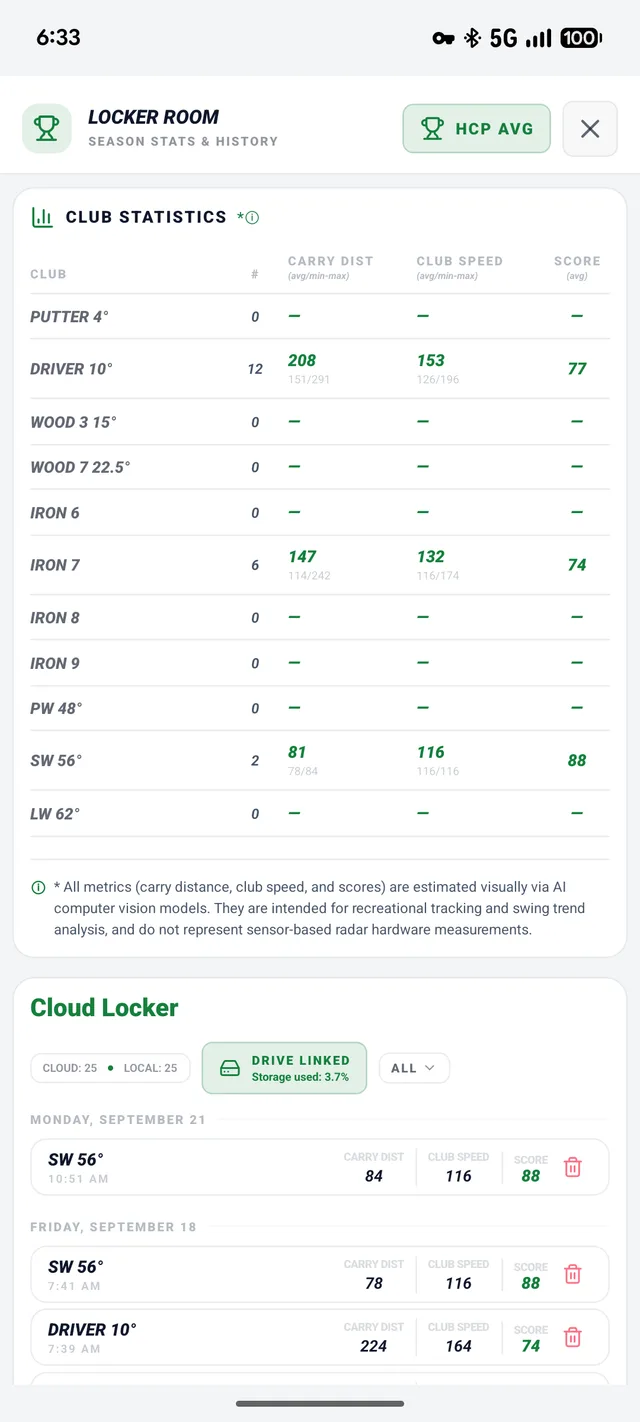
Club statistics

Bar: lowest to highest of your swings. Dot: your average.

  • Average and max carry and club speed for every club in your bag
  • Average swing score, so you can see if you're getting better
  • Cloud Locker: every swing, on your phone and in the cloud
  • A history of every round you've played

Your practice feeds the caddy. Caddy's Mode uses these numbers to recommend a club on the course, so the distances you hit in practice decide what it suggests.

Locker Room club statistics table with carry, club speed and score per club
Caddy's Mode · On the course

A GPS caddy in your pocket.

The other half of the app, built for the course.

  • Satellite map, distance to the pin, and every shot logged
  • Club recommendations based on distances from your own practice
  • Rules built in: penalties, drops, stableford and handicap
  • Shared course library: every scanned course is ready for other players
AI Course Scorecard scanning screen
AI scorecard scan

Photograph the course card and the AI reads the par, stroke indexes and tees for you.

DRIVER 10°209 m IRON 7147 m HOLE 1 · PAR 4 · 383 m
To pin383M
Driver (10°)Recommended · 209 m in practice
Caddy's Mode satellite map with club selector and 383 metres to pin
After the round · Scorecard

The whole round, broken down.

When you walk off the 18th, everything is in one place.

Example round
Par Bogey Double bogey+

Tap a hole. In the app, it replays the shots on the map.

Total strokes102
Putts per hole2.6
Avg. putt distance12 m
Longest putt25 m
  • Score, stableford and differential to your handicap
  • All 18 holes with color-coded results
  • Tap a hole to replay its shots on the map
  • Club performance on the course versus in practice
  • Putting analysis: putts per hole and distances
Design

Light or dark, one tap away.

The app has two complete color modes, and you switch between them with a single tap.

  • Light mode stays readable in full sun, on the course and at the range
  • Dark mode is easy on the eyes in the evening and saves battery
  • The same features and layout in both
Hub screen in dark mode Hub screen in light mode
LightDrag to compareDark
Pricing

A month free. Then pick your plan.

Every plan includes Coach's Mode and Caddy's Mode.

Free

$0
  • 1 month of full access
  • 10 AI analyses
Start free

Weekly

$5.99/ week
  • 20 AI analyses a week
  • Rounds, scorecards and every other feature without limits
Choose plan

Monthly

$14.99/ month
  • 100 AI analyses a month
  • Rounds, scorecards and every other feature without limits
Choose plan
Save 50%

Yearly

$89.99/ year
  • 100 AI analyses a month
  • Rounds, scorecards and every other feature without limits
Choose plan

Payments and VAT are handled by the App Store and Google Play.

FAQ

Questions, answered.

Do I need any extra hardware?

No. Your phone films the swing and runs the GPS caddy, so you don’t need sensors or a radar.

How accurate are club speed and carry?

They're visual estimates from the video, made with AI computer vision. They're reliable for tracking consistency and trends, but they don't replace radar or sensor-based launch monitors.

How long does an analysis take?

About 20 seconds per swing.

Where are my swing videos stored?

In your Cloud Locker, with a backup in your own Google Drive.

Which languages does it support?

English, Czech and German, for both the app and the AI swing analysis.

What happens after the free month?

You choose a weekly, monthly or yearly plan. The weekly plan includes 20 AI analyses a week, the monthly and yearly plans 100 a month, and every plan has all other features without limits. You subscribe through the App Store or Google Play.

Stop guessing. Start fixing.

Download TakeDivotAI and get your first month free.